
A rate can look good until you count the deadhead, the fuel, the driver and the days the truck is out. Then it's not so good.
The TFS Load Calculator is built around how Landstar BCOs get paid. Run any load in seconds and get a clear answer before you commit.
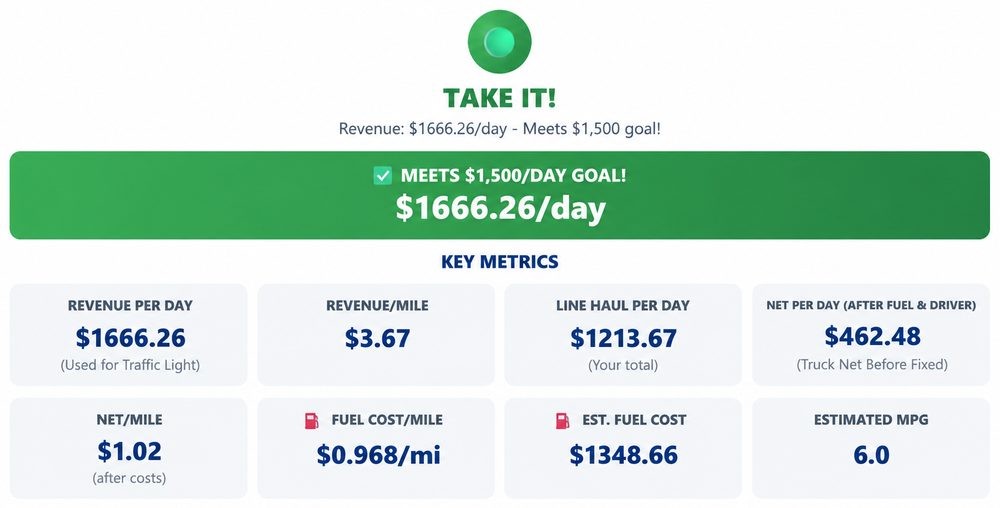
Tap to enlarge
Set your daily revenue goal once.
Every load gets a clear verdict, TAKE IT or NEGOTIATE, based on what it earns per day against your goal.
Search the pickup and delivery, and TFS calculates the miles and transit time.
Add your deadhead miles, pickup and delivery windows, solo or team. The calculator counts the days the truck is really out.
TFS fills in the current DOE diesel price for the region (or enter your own discounted price), uses your truck's MPG, and includes driver pay, so the number you see is what the truck actually keeps.
See your fuel cost per mile and your net per mile before you commit.
TFS AI gives you a recommendation and checks your own delivered loads:
Like the numbers? Save the load right from the calculator.
It goes straight to your dispatcher, ready to assign a driver.