
Fuel is one of your biggest costs, and it changes every week. If you don't know your real fuel cost, you don't know your real profit.
TFS FleetOS helps owner-operators and Landstar BCOs see live diesel prices, the fuel cost of every load, and what you actually spent, all in one place.
Tap to enlarge
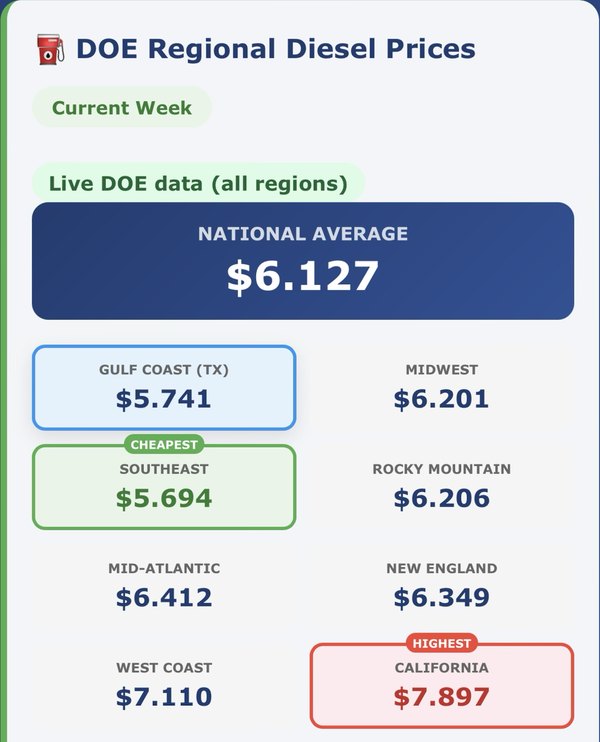
See the national average and 8 regions on your dashboard: Gulf Coast, Midwest, Southeast, Rocky Mountain, Mid-Atlantic, New England, West Coast and California.
The cheapest and highest regions are marked so you can see the difference at a glance.
When you add a load, TFS fills in the diesel price for the region where it picks up. If you pay less with a fuel discount, enter your own price instead.
TFS uses your truck's MPG to show the fuel cost before you commit.
See your fuel cost per mile on every load.
Landstar BCOs also see an estimated fuel surcharge on each load.
Enter fuel and DEF purchases in Expenses.
Your reports use your actual fuel when you've entered it, and the load estimate when you haven't.
TFS even warns you when fuel receipts may be missing.
Fuel is part of your profit per load and per truck, and part of your weekly and monthly profit reports by email.
Filter by dates, see the expense breakdown, and export a PDF.